Telegram Scraper, Group & Channel Adder Software
Telegram Scraper Software is a Windows-based application designed to help users
scrape available Telegram groups, channels, and members, extract Telegram data, export collected
information, and manage supported member-adding workflows.
The software combines Telegram Group Scraper,
Telegram Channel Scraper,
Telegram Member Scraper,
Telegram Member Extractor,
Telegram Data Extractor,
Telegram Group Adder, and
Telegram Channel Adder functionality in a single desktop application.
Whether you need a Telegram group member scraper, Telegram channel data extraction,
member export to Excel, multi-account management, or supported Telegram group and channel member
management, the software provides these features through one Windows interface.
Telegram Multi Account Group & Channel Member Scraper and Adder
Telegram Group and Channel Adder Software provides multiple Telegram scraping and member-management
features designed to simplify Telegram community administration and audience research.
- Scrape available Telegram group and channel member information from accessible chat history.
- Extract Telegram member information for supported groups and channels.
- Manage supported member-adding workflows for your Telegram groups and channels.
- Configure multiple Telegram accounts from the software.
- Use account rotation functionality for supported workflows.
- Export Telegram groups and members to Excel.
- Authenticate accounts using Telegram API credentials.
This professional Telegram channel scraper and group member scraper software
can extract available group member information from accessible Telegram chat history.
You can also manage multiple Telegram accounts and organize supported member-management workflows.
The application is useful for Telegram marketers, community managers, businesses, agencies,
researchers, and Telegram group administrators who need a Windows-based
Telegram scraping and member management tool.
Telegram Member Scraper Software
The Telegram Member Scraper allows users to collect available member information
from supported Telegram groups and channels. Instead of manually reviewing large Telegram
communities, you can use the software to organize available member information and export
the collected results.
Telegram member scraping can be useful for audience research, community analysis, marketing
research, lead organization, and Telegram group management. The information available for
extraction depends on Telegram access, privacy settings, group configuration, and API behavior.
Telegram Member Scraper Features
- Telegram group member extraction
- Telegram channel data extraction
- Telegram member information collection
- Telegram group discovery
- Member export to Excel
- Group export to Excel
- Multi-account management
- Supported member-management workflows
Telegram Group Scraper
The built-in Telegram Group Scraper helps retrieve available Telegram groups
associated with your configured account.
After configuring and authenticating your Telegram account, click the
Scrap Groups button. The software retrieves available Telegram groups and
displays them inside the application.
You can then export your Telegram group information to Microsoft Excel using the
Export Groups option.
This provides a convenient workflow for users searching for a
Telegram group scraper, Telegram group extractor, Telegram group member scraper,
or Telegram data extraction software.
Telegram Channel Scraper
In addition to groups, the application provides Telegram Channel Scraper
functionality for supported Telegram channels.
The software helps users organize available Telegram channel information and manage supported
data extraction workflows from a Windows desktop application.
Telegram channel scraping functionality can be useful for channel research, audience analysis,
community management, and legitimate Telegram marketing research.
Telegram Group Member Extractor
The Telegram Group Member Extractor provides an easy way to retrieve available
member information from supported Telegram groups.
Select the required group and click Get Members. The application will process
available member information from accessible Telegram chat history.
After extraction, click Export Members to export the available Telegram member
information to an Excel file.
Telegram Data Extractor and Excel Export
Telegram Group and Channel Adder Software also works as a
Telegram Data Extractor. Available Telegram group, channel, and member information
can be collected and organized for further analysis.
Microsoft Excel export makes it easier to organize Telegram datasets, maintain records,
analyze community information, and use the collected information in other legitimate business
workflows.
Export Telegram Members to Excel
Once Telegram member information has been collected, simply use the
Export Members button to save available member information to Excel.
Telegram group information can similarly be exported using the
Export Groups button.
Telegram Multi Account Software
The application supports multiple Telegram accounts, making it suitable for users
who manage several Telegram communities.
Multiple account configuration can help businesses, agencies, community managers, and marketers
organize Telegram workflows without maintaining separate applications for every account.
Account rotation functionality is available for supported workflows. All accounts should be
operated according to Telegram's current platform rules, API restrictions, privacy requirements,
and applicable messaging regulations.
Telegram Group Adder Software
Telegram Group Adder Software provides supported functionality for managing
member operations between Telegram groups.
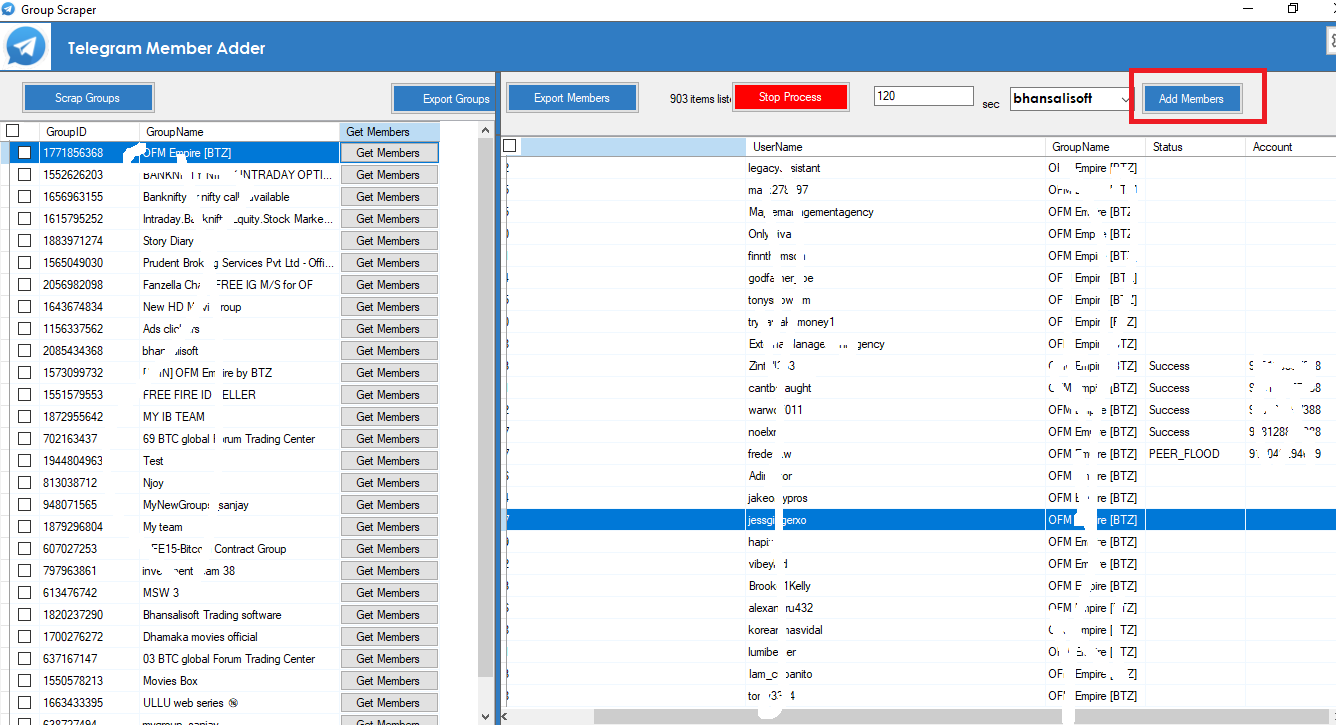
After collecting available members from a source group, users can select a destination group
from the software interface and use the available member-management functionality.
A typical workflow is:
Scrape Telegram Groups →
Extract Available Members →
Export/Review Members →
Select Destination Group →
Manage Supported Member Operations
Member operations depend on Telegram permissions, privacy settings, account status, group
configuration, and Telegram's current platform restrictions.
Telegram Channel Adder Software
The Telegram Channel Adder functionality provides supported workflows for
Telegram channel and community management.
Together with Telegram member scraping, data extraction, multi-account configuration, and
Excel export, this provides an integrated Telegram management solution for Windows users.
Telegram Marketing Software
Telegram communities are used by businesses, creators, marketers, organizations, and online
communities to communicate with audiences.
This Telegram Marketing Software helps organize audience research, Telegram
data collection, member extraction, community analysis, and supported member-management tasks.
For sustainable Telegram marketing, users should combine audience research with relevant
content, permission-based communication, community engagement, and legitimate promotional
strategies.
Telegram Lead Generation and Audience Research
Telegram groups often focus on particular industries, interests, technologies, products,
services, and communities. Analyzing relevant communities can therefore help businesses
understand their target audience.
The Telegram Member Scraper can support legitimate Telegram lead research by
organizing available member and community information. Collected data should always be handled
responsibly and in accordance with applicable privacy rules and Telegram policies.
Getting Started with Telegram Scraper Software
- 🟢 Extract the ZIP file and run TelegramAdder.exe.
-
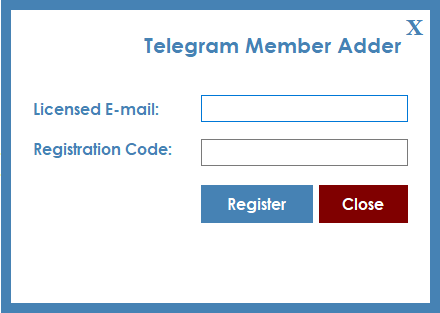
🟢 Register your licence as shown in the registration screen.
- Licence Email: Send us an email for purchase code information.
- Registration Code: Enter your purchase/registration code.
- After successful registration, you can use the software.
Telegram Scraper Software Demo Video
Check the Telegram Scraper and Group Adder Software demo video:
Project Requirements
- .NET Requirement
- Microsoft Excel
- Windows Computer
- Telegram Account
- Telegram API ID and API Hash
- Internet Connection
Telegram Scraper Software Installation Process
-
You will receive the compiled software. Source code is not included with the standard product.
-
After purchasing the product, your purchase code is used as the licence/registration code.
If you face an issue, email us at
bhansalisoft781986@gmail.com
.
-
You can check how to find your Envato Purchase Code here:
Where Is My Purchase Code?
-
After your purchase code is confirmed, unzip the main file and run
TelegramAdder.exe.
-
Register your licence using:
- Licence Email: Registered Email
- Registration Code: Envato Purchase Code
- After successful registration, you can use the software.
Getting Started
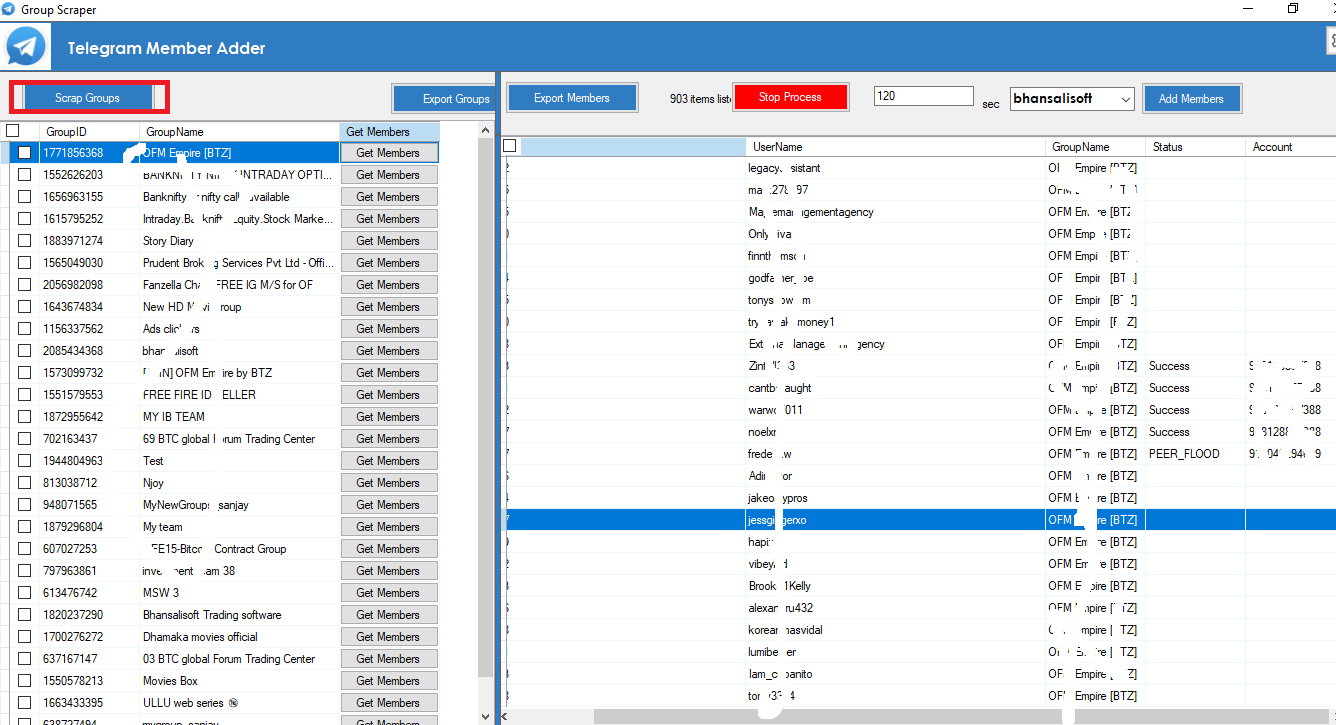
Start Telegram Scraper Software
After registering the licence, start the software. The main Telegram Group and Channel
Scraper interface will appear.
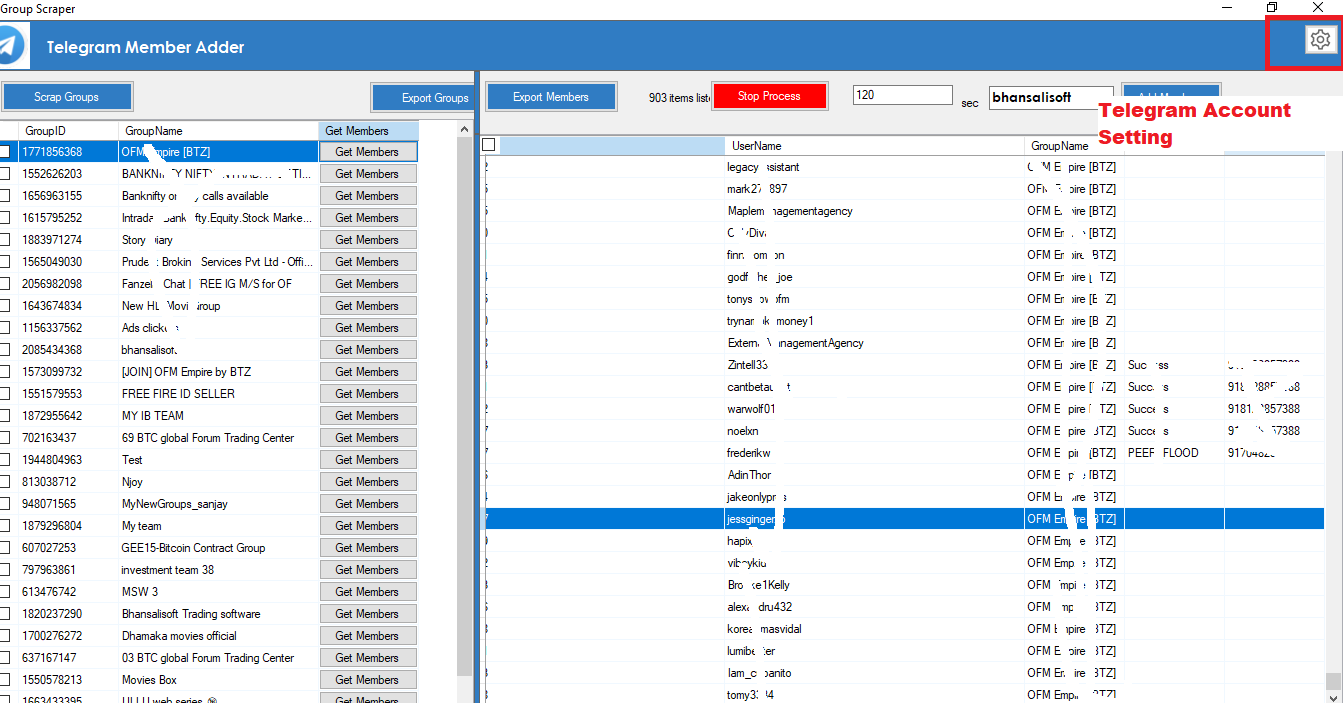
Telegram Account Configuration
Click the Settings icon on the top bar.

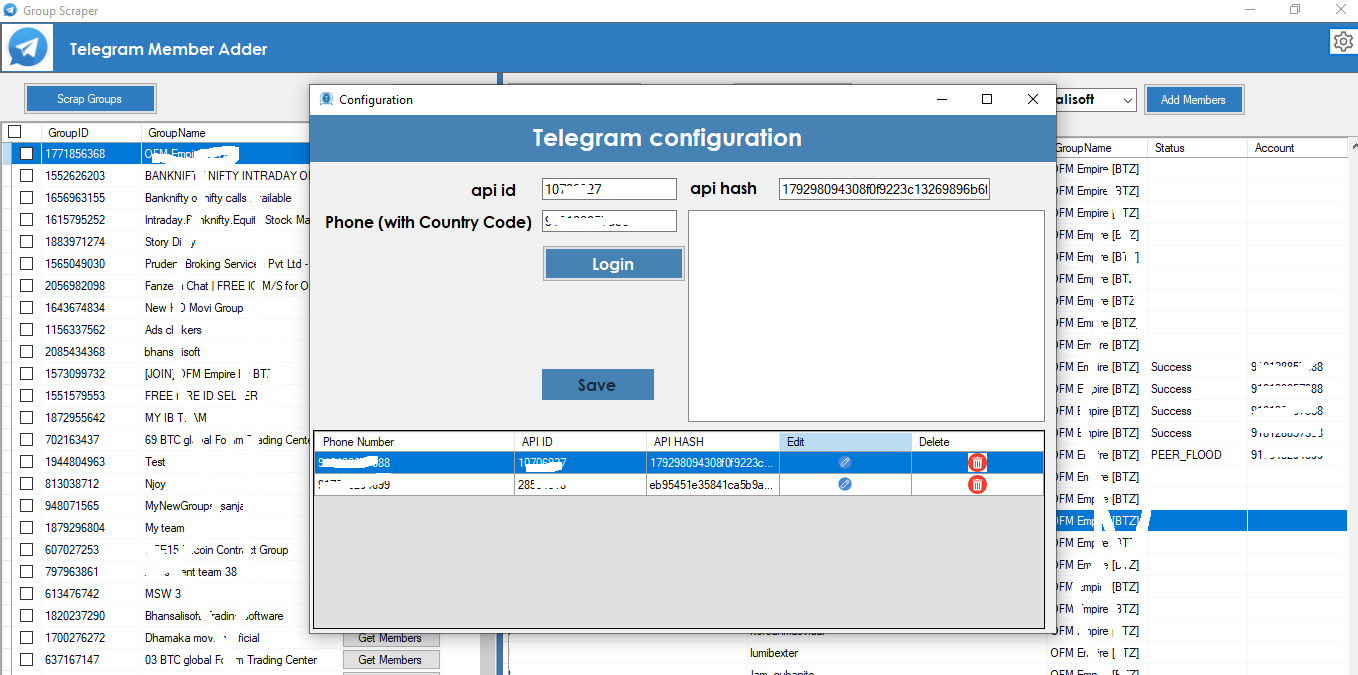
-
API ID: Enter your Telegram API ID.
-
API Hash: Enter your Telegram API Hash.
-
To generate your Telegram API ID and API Hash, check Telegram's API documentation:
Obtain Telegram API ID and API Hash
-
Phone (With Country Code):
Enter your Telegram account phone number with the country code.
For example, India's country code is 91.
-
After filling in the details, click the Login button.
Telegram will send a login verification code.
-
Enter the verification code in the software and click
Verify.
-
Click Save to save the configuration in the software.
How to Use Telegram Group Scraper
-
From the main screen, click Scrap Groups.
The software will retrieve available Telegram groups associated with your account.
-
Click Export Groups to export available group information to Excel.
Extract Telegram Group Members
-
Select the specific Telegram group from which you want to extract available members.
-
Click the Get Members button.
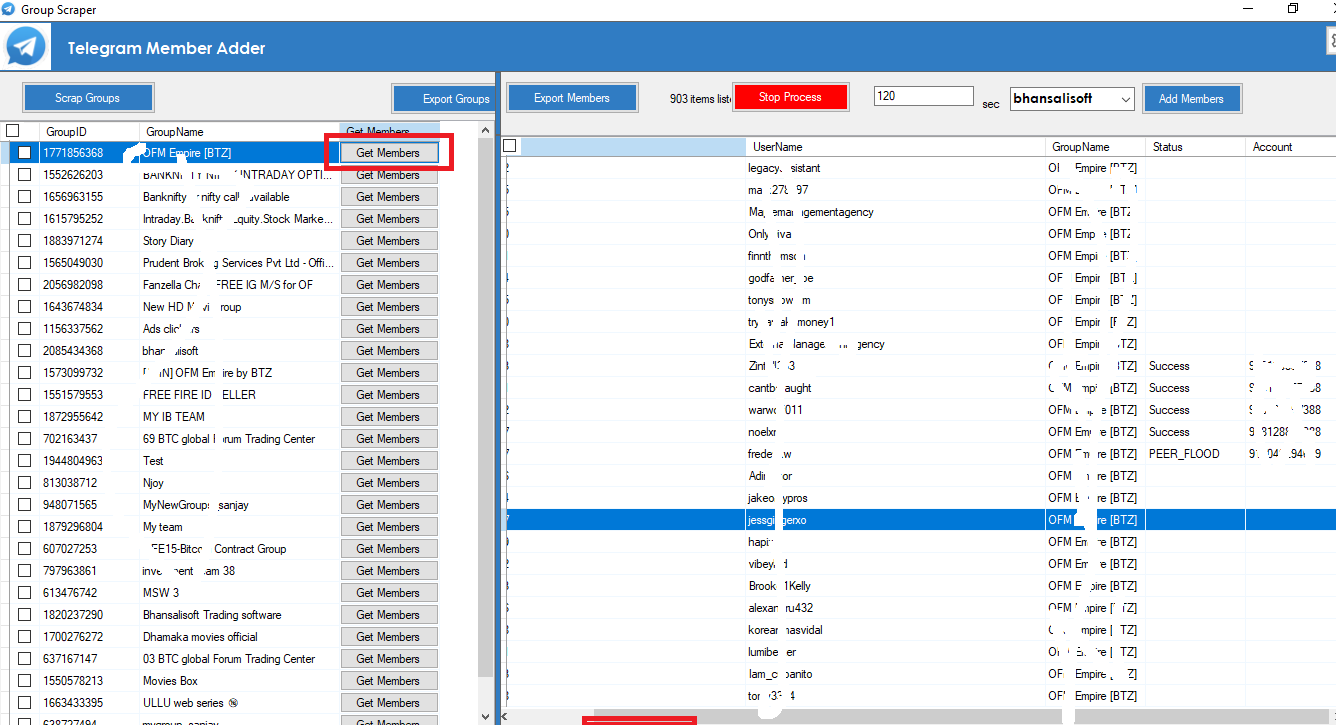
The software will process available member information from accessible Telegram chat history.
Click Export Members to export the available Telegram group member data
to an Excel file.
Add Group Members from One Group to Another
For supported member-management workflows, select the destination group from the combo box
and click the Add Member button.
Frequently Asked Questions About Telegram Scraper Software
Does Telegram Scraper Work with Channels Too?
Yes. The software provides supported Telegram group and channel-related functionality.
Available data and member-management operations depend on Telegram permissions, privacy settings,
account access, and current Telegram API restrictions.
Is Adding Telegram Members Based on IDs Better Than Usernames?
Telegram users may have numeric identifiers even when they do not have a public username.
Therefore, identifier-based data can sometimes provide more complete internal records than
relying only on public usernames.
Whether a user can be processed in a particular member-management workflow depends on Telegram's
current API behavior, privacy settings, permissions, and account restrictions.
How Fast Is Telegram Scraper for Scraping Members from Groups and Channels?
Telegram scraping speed can vary depending on the Telegram account, network connection,
Telegram API response time, group size, available chat history, rate limits, and other
platform restrictions.
The premium version is designed for production use, while a trial version may be intended
primarily for evaluating the software interface and functionality.
Is There Any Limit on Scraping Members from Telegram Groups or Channels?
Telegram's API limits and platform restrictions can change over time. The amount of available
information and the number of operations that can be performed depend on Telegram's current
rules, account status, privacy settings, API responses, and group or channel configuration.
Multi-account functionality is provided for legitimate account and community management.
It should not be used to evade Telegram restrictions or platform safeguards.
Are There Ethical Considerations When Using Telegram Scraper Software?
Yes. Always respect the privacy of Telegram users and use collected information responsibly.
Avoid spam, harassment, malicious use, unauthorized data processing, or other prohibited
activities.
Telegram audience research can be used to understand communities based on relevant topics,
keywords, industries, or interests, but collected data should always be handled within
appropriate legal, ethical, and platform boundaries.
How Do I Fix Login Issues While Using Telegram Scraper?
Common login problems can include an invalid phone number, incorrect verification code,
incorrect API credentials, expired codes, temporary Telegram restrictions, or account
authorization issues.
First verify that your phone number, country code, API ID, API Hash, and verification code
are correct.
You can also review your Telegram active sessions and remove old or unwanted sessions.
If Telegram has temporarily limited authorization attempts, wait before attempting another login.
Is Telegram Group and Channel Adder Software Legit or Safe?
The software is designed to work with Telegram account authentication and supported Telegram
workflows. Users remain responsible for how they use the application and collected information.
Do not use the software to spam users, circumvent Telegram restrictions, access unauthorized
information, or perform prohibited activities. Always follow Telegram's current Terms of Service,
API requirements, privacy requirements, and applicable laws.
Do I Need Coding Skills to Use Telegram Scraper Software?
No programming knowledge is required for the standard desktop application workflow.
The graphical interface allows users to configure Telegram accounts, retrieve groups,
extract available member information, export results, and manage supported operations
without writing Python or other programming code.
How Do I Install Telegram Scraper?
Download the Telegram Scraper Software package from the official product website and extract
it on your Windows computer.
Run TelegramAdder.exe and complete the licence registration process.
After activation, configure your Telegram API ID, API Hash, and account phone number.
Complete Telegram verification and save the account configuration. You can then access
supported Telegram group scraping, member extraction, Excel export, and member-management
features.
What Is Scraping in Telegram?
Telegram scraping generally refers to collecting available Telegram information using
software, APIs, or other supported interfaces.
Depending on the software and account permissions, this can include information about
Telegram groups, channels, messages, and available members.
A Telegram Member Scraper automates parts of this collection process so
users do not need to manually copy available information from individual Telegram communities.
How Can I Use Telegram Scraper for Telegram Marketing?
Telegram scraper software can support legitimate marketing research by helping users analyze
relevant communities, organize available audience information, export data, and understand
potential target audiences.
For example, businesses can research Telegram communities related to their industry and use
available information to understand audience interests and improve community strategy.
Telegram marketing should focus on useful content, community engagement, permission-based
communication, audience research, and responsible promotion rather than unsolicited spam.
Who Can Use Telegram Scraper and Group Adder Software?
- Telegram group administrators
- Telegram channel managers
- Community managers
- Digital marketing agencies
- Social media marketers
- Audience researchers
- Lead generation teams
- Businesses managing Telegram communities
- Organizations managing multiple Telegram accounts
Why Choose Telegram Group and Channel Adder Software?
Instead of maintaining several different applications for Telegram scraping, group extraction,
member collection, Excel export, and account management, this application combines the main
workflows into one Windows desktop interface.
Telegram Group Scraper
Retrieve available Telegram groups associated with your configured Telegram account and
export group information for further processing.
Telegram Channel Scraper
Work with supported Telegram channel information and organize available data from one
desktop application.
Telegram Member Scraper
Extract available Telegram member information from supported groups and accessible chat history.
Telegram Member Extractor
Organize available Telegram member data and export collected information to Excel.
Telegram Group Adder
Manage supported Telegram group member workflows using the application's destination group
selection and member-management functionality.
Telegram Multi Account Management
Configure multiple Telegram accounts for legitimate multi-account and community-management
workflows.
Telegram API Integration
Configure your own Telegram API ID and API Hash and authenticate supported Telegram accounts
through Telegram's authorization process.
Telegram Scraper Software for Windows
Telegram Group and Channel Adder Software is designed for Windows users who want a graphical
desktop application rather than building their own Telegram automation scripts.
The software combines Telegram Member Scraper, Telegram Group Scraper,
Telegram Channel Scraper, Telegram Member Extractor, Telegram Data Extractor,
Telegram Group Adder, Telegram Channel Adder, multi-account management,
and Excel export functionality.
This makes it a complete desktop solution for organizing supported Telegram data extraction,
audience research, community management, and member-management workflows.
Start Using Telegram Member Scraper & Group Adder Software
If you are looking for Telegram Scraper Software, Telegram Member Scraper,
Telegram Group Member Scraper, Telegram Group Scraper, Telegram Channel Scraper,
Telegram Member Extractor, Telegram Group Adder Software, Telegram Channel Adder Software,
Telegram Marketing Software, Telegram Data Extractor, or Telegram Multi Account Software,
this Windows application brings these features together in one interface.
Extract available Telegram group and member information, export results to Excel,
configure multiple accounts, research Telegram communities, and manage supported
Telegram workflows from one desktop application.
Important: Always use Telegram automation and data extraction responsibly.
Respect user privacy, obtain appropriate permissions where required, avoid unsolicited spam,
and comply with Telegram's current API requirements, Terms of Service, and applicable laws.